Mini Sudoku guide
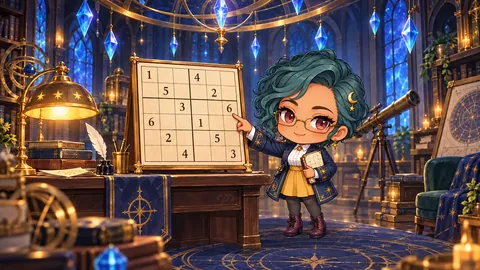
Fill a 6×6 grid so every row, column and 2×3 box holds 1 to 6 exactly once, with Sera, the observatory's logic researcher, commenting on your progress. The twelve 6×6 puzzles take one to three minutes each, every one has a single solution, and any of them can be chosen from the start. For a longer challenge, the 9×9 button switches to standard Sudoku with 42 practice puzzles and a daily puzzle.
- Genre
- Logic Puzzle
- Difficulty
- Normal
- Players
- Solo
- Controls
- Tap / drag · keys 1–6 · Arrow keys · Backspace / Delete · P / Esc pause · Gamepad
How to play
- Choose a level from 1 to 12 below and press Start puzzle. All twelve levels are open from the beginning.
- Tap an empty cell, then tap a number on the pad below to enter it. The cell's row, column and box are highlighted, and the numbers that could still fit are marked as candidates on the pad.
- The small figure on each pad button shows how many more of that number the grid still needs. A zero means all six are already placed.
- A number that differs from the solution shows red stripes and adds one to the Edits count. Numbers repeated in a row or box are also marked red, so clear them and try again.
- The puzzle is complete when all 36 cells hold the right numbers. The result shows your edits, the number of clues and your time before you move on.
- Keyboard: arrows move, number keys 1–6 enter, Backspace, Delete or 0 clears, P or Esc pauses. Gamepad: A starts, the stick moves between cells, X picks the number to enter and A enters it. Menu pauses.
Strategy tips
- Medals depend on edits: no mistakes earns three, up to three mistakes earns two, and more earns one. Leave a cell empty until you are sure rather than guessing.
- Score starts at 300 plus 25 per empty cell in the puzzle, then loses 40 per edit and 2 per second past 90 seconds, with a floor of 60. Later levels have fewer clues and a larger base score.
- Selecting a cell makes Sera report how many numbers are possible there. While the grid has no wrong entries, a cell with a single candidate can be filled at once, so hunt for those first.
- Each 2×3 box is a wide rectangle spanning two rows. Look for a number that has only one possible cell inside a box; it often breaks a puzzle open faster than scanning whole rows.
- A number picked with the gamepad's X button only shows with a dashed outline and is not judged yet. It is entered when you press A or move to another cell, so stop on the number you want before entering it.
Common questions
Can I play standard 9×9 Sudoku?
Yes. The 9×9 button opens 42 practice puzzles (3 easy, 15 normal, 12 hard, 12 expert) and a daily puzzle that changes with the date. It offers notes, candidate display, undo and a hint that explains the next logical step; on a phone you pick a 3×3 box, then tap a cell in the enlarged view.
Does a wrong number block my input?
No. Input is never refused; the cell is marked red and the edit count goes up. Clear it, enter the right number and keep solving.
Will I lose my board if I leave?
Your board and elapsed time are saved to two recovery slots whenever you enter a number, whenever the state changes, such as pausing, and every 15 seconds. Reopen the game to continue the same puzzle; 6×6 and 9×9 progress are kept separately.
Can I restart the same puzzle?
From the pause screen, choose Restart this puzzle and confirm to clear your entries and time and start the same puzzle over. Medals and best records you already earned remain.
More guides in this genre
- Rina's Bottle Sort guidePour coloured water between bottles with glass researcher Rina until every bottle holds a single colour.
- Nora's Pin Rescue guidePull the pins in the right order with firefighter Nora so the marbles reach the basket and the lava never does.
- Tessa's Tile Link guideJoin matching picture tiles with tile master Tessa along an empty path with no more than two bends until the board is clear.
- Harin's Meadow Minesweeper guideOpen every safe cell of a spring meadow with explorer Harin, reading the numbers to avoid the hidden puffball mushrooms.
← All game guidesLast updated 2026.10.23